Turn MP3 or WAV audio into video
Make a music video from your MP3 or WAV in Beatway Studio. Preview landscape and vertical layouts, then prepare the release for your connected platforms.
Build the video and its release materials
Audio and visuals together
Review a visual treatment around your instrumental before preparing the final video.

Cover art and copy included
Title, description, and tags are generated together with the video.
Multi-platform export
One beat → video for YouTube, TikTok, Instagram, and more.
How to make a video from audio
Upload your track
MP3 or WAV — in Beatway studio.
Build the video
The system lays a visual over it and preps formats.
Publish
Review the video and release details, then publish to the platforms you have connected.
From an audio file to a music release
An MP3 or WAV contains sound. A video adds a visual layer and packages both into a file you can publish. For a beatmaker, the practical goal is a clear preview of the instrumental with a path to the full release or license.
What goes in and what comes out?
Start with your finished MP3 or WAV and artwork you are allowed to use. In Beatway Studio, choose the visual treatment and review the landscape and vertical previews before publishing.
Renaming a file from .mp3 to .mp4 does not make a video. The audio needs to be combined with a visual and encoded. Beatway's final video assembly produces MP4 files.
| Asset | Format | What to check |
|---|---|---|
| Source audio | MP3 or WAV | Use the final mix; listen for clipping and unwanted silence. |
| Landscape video | 16:9 · 1920 × 1080 | Check the full composition and artwork at landscape size. |
| Vertical video | 9:16 · 1080 × 1920 | Keep important text and artwork clear of the crop. |
| Editor preview | Lower resolution | Use it to check layout and timing; final publishing renders at 1080p. |
Choose the visual for the way people will listen
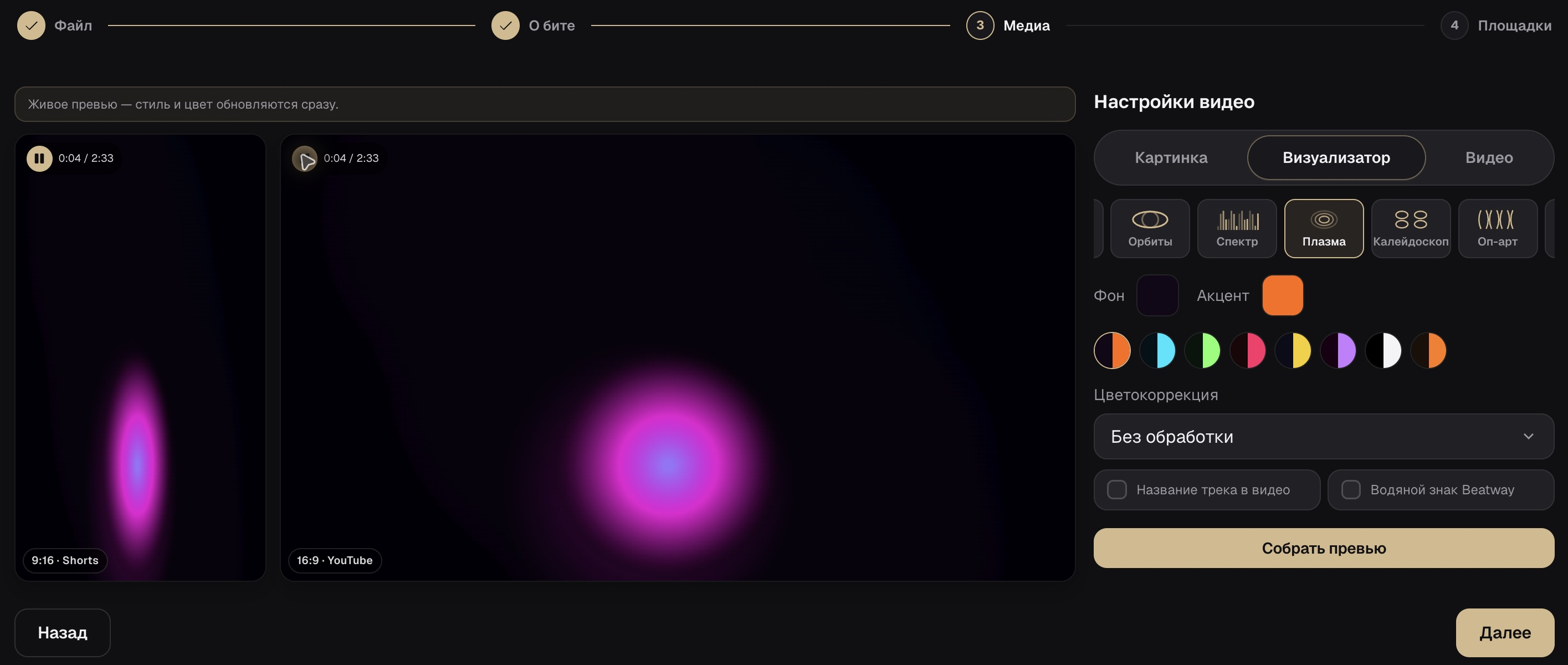
Artwork keeps attention on the music and gives a catalog a consistent identity. A music visualizer adds motion around the track. Review the selected style in the real editor shown above before committing to it.
For a full instrumental, check both the opening and the ending. For a short excerpt, start with a representative musical moment and make sure the cut still feels intentional.
Check the video before it reaches listeners
Previewing a release is also a chance to catch mismatched files: an old mix, the wrong cover, or a description that links to a different beat.
- Listen to the opening, loudest section and ending.
- Review both landscape and vertical crops.
- Keep the track name readable on a phone.
- Check that BPM and key match the final project.
- Open the purchase link and confirm that the correct beat is available.
- Review the connected platform and visibility settings before publishing.
One beat, a consistent title and description
Here is an illustrative release brief, not a promise of views. Use your own sound, artwork and actual license terms. Keep the same track name in the video, store listing and purchase link.
Track: Midnight Static
Style: Dark trap instrumental
BPM: 140
Key: F minor
Video: landscape full beat + vertical excerpt
Description: preview summary, BPM, key, license link, producer creditFrequently asked questions
How do I turn an MP3 into an MP4 video?
Combine the audio with artwork or a visual treatment, then encode both as video. In Beatway, upload an MP3 or WAV in Studio, review the visual preview and prepare the release. Changing the file extension alone will not convert it.
Which video sizes does Beatway produce?
Final video assembly uses 1920 × 1080 for landscape and 1080 × 1920 for vertical MP4 videos. Editor previews use a lower resolution so you can review the layout before the final render.
Do I need an account?
Yes. Audio-to-video preparation happens in Beatway Studio and requires sign-in. Review the current plan and limits before starting a release.
Can I upload audio directly on this page?
Open the video editor to upload your track in Studio. This page explains the workflow and shows the real editor; it does not upload or convert files itself.
How is this different from a music visualizer?
A visualizer is the visual treatment around the sound. Audio-to-video assembly combines your audio and selected visuals into a video for the release.
Ready to publish?
Upload a beat to Beatway — cover art, tags, video, and export to every platform, all in one place.
Open the video editor