Beatway
How to Sell Beats Online: Your First Catalog, Listing and Release

To sell beats online, connect four things: finished instrumentals, clear license terms, a working checkout and a way for suitable artists to discover the catalog. A store gives people somewhere to buy; your releases and relationships give them a reason to visit.
Start with one store and one audience channel. You can expand once you can reliably prepare a listing, publish a preview and deliver the right files.
1. Prepare a small, coherent catalog
Pick 5–10 finished beats that fit a recognizable sound. This is a manageable starting batch, not a minimum required by a platform. An artist who likes one instrumental should be able to find another that fits the same project.
For each beat, keep these assets together:
- A final WAV and a listening preview.
- Stems or trackouts, if your offer includes them.
- The track name, BPM, key, genre and mood.
- Artwork you have permission to use.
- Your license terms and contact information.
- A direct link to that beat's purchase page once it is live.
Check that the preview and paid files use the same version of the mix. Export stems from the same start position so they line up when imported into another project.
If a working filename such as trap_final_7 is the only name you have, use the beat name generator to make a shortlist. Keep the chosen spelling consistent in the files, video and store.
2. Choose where the purchase will happen
Separate the place people hear the beat from the place they buy the license. YouTube, short videos and social conversations can lead to the same store listing.
| Sales setup | Why consider it? | What you still need to handle |
|---|---|---|
| Beat marketplace, such as BeatStars | A beat-focused catalog and familiar buying context | Your offer, files, license details and a plan to bring relevant listeners |
| Your own storefront, including an Airbit store | A consistent destination built around your producer identity | Store presentation, traffic and clear purchase links |
| General digital-download store | A way to sell and deliver files alongside other digital products | A clear explanation of beat licenses and what each download contains |
| Direct custom or exclusive work | A conversation about a specific artist's requirements | The agreement, payment process, scope, revisions and delivery |
Check the current plan, fees, payment availability and delivery options before choosing a service. A marketplace presence does not guarantee that buyers will find your beats.
The official BeatStars site, Airbit seller page and Payhip beat-selling page describe their respective approaches. For a focused comparison, read BeatStars vs. Airbit.
3. Make the license and file options understandable
A buyer should know what they receive and what they may do before paying. File format and permission are separate questions: a WAV file does not automatically grant broader rights than an MP3.
A non-exclusive license can permit more than one customer to use a beat under agreed conditions. An exclusive offer needs its own clear agreement, including how earlier licenses are treated. The contract matters more than the label on a button.
For each offer, explain:
- Which audio files are delivered.
- Which uses are permitted and any relevant limits.
- The required producer credit.
- Any agreed royalty or songwriting arrangements.
- Who handles Content ID and disputed claims.
- How the customer can ask for clarification.
If the beat contains samples, check the source permissions before listing it. Read the guides to beat copyright and licensing and sample permissions. These general explanations do not replace an agreement suited to your situation.
4. Create one complete listing
The following is an illustrative listing brief, not a legal license or a claim about sales performance. Replace the placeholders with your own files, sound and actual offer.
Track: Midnight Static
Sound: Dark trap instrumental with a sparse melody
Tempo / key: 140 BPM / F minor
Preview: Tagged listening version
Available files: State the MP3, WAV or stems in each option
Usage: Link to the exact license for each option
Credit: State your required producer credit
Purchase: Direct URL for this beat
Questions: Your contact address
Use a preview that accurately represents the paid instrumental. If you use a producer tag on the preview, make clear which files the customer receives after purchase.
The screenshot below shows Beatway's release-details screen, where track information and artwork are prepared. The pictured interface is in Russian; it is a product example, not a store checkout or a customer revenue result.
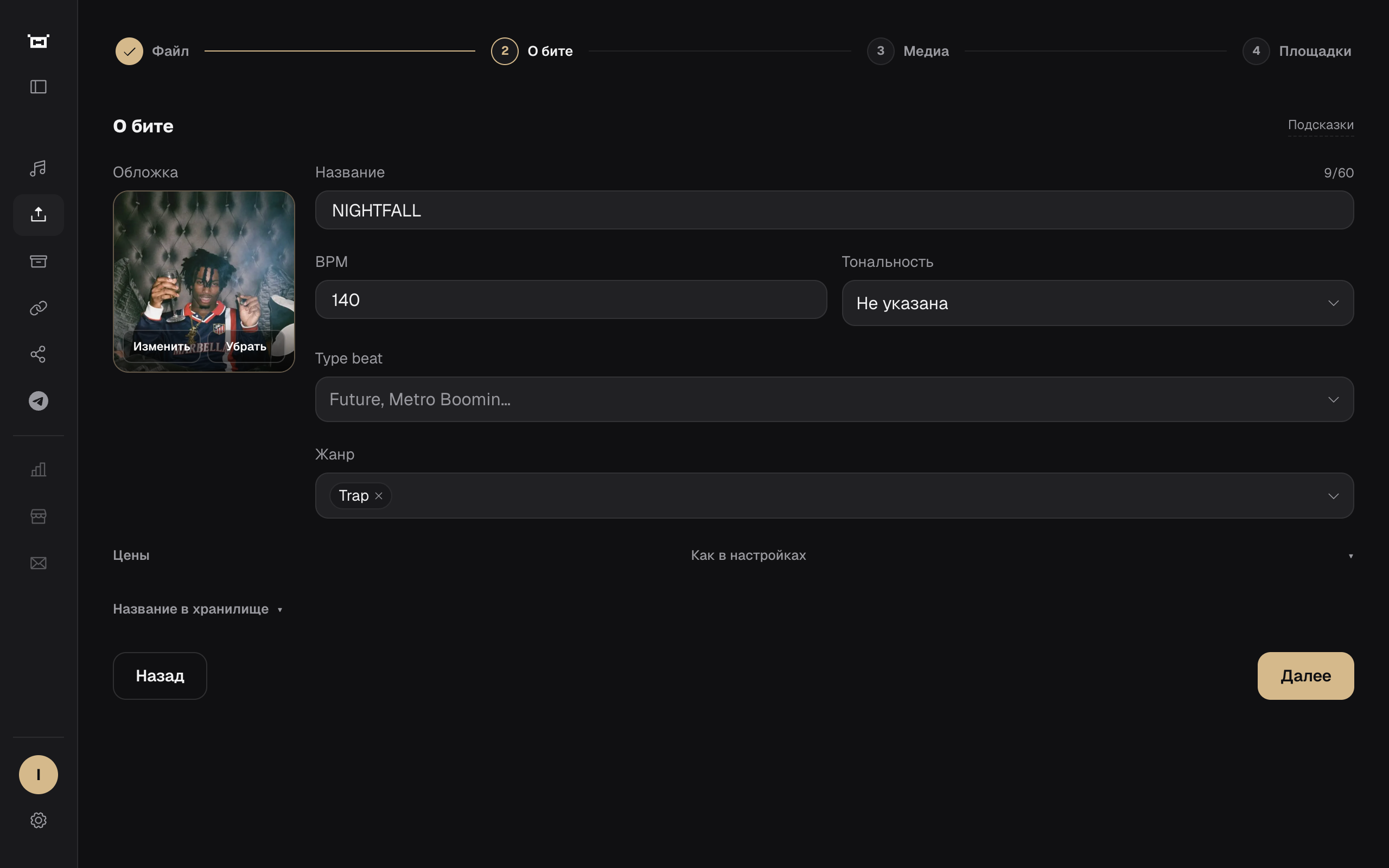
Beatway helps prepare release materials. Your chosen store or agreed direct-sales process remains responsible for the license purchase and delivery.
5. Turn the beat into a searchable video
Use a title that identifies the sound without promising something the track does not deliver. A track name alone may tell a new listener very little; a relevant style reference provides context.
For example:
Title: Dark Trap Beat — Midnight Static

Description:
Listen to Midnight Static, a dark trap instrumental.
BPM: 140 | Key: F minor

License options and purchase: [your direct listing URL]
Producer credit: [your required credit]
Questions: [your contact]
An artist-inspired type beat title can also describe the sound when the reference is accurate. Avoid implying that the artist worked on the release.
Use the audio-to-video workflow to prepare a video from your MP3 or WAV, then follow the YouTube upload checklist. Review the landscape and vertical crops instead of assuming one composition works everywhere.
Write a clear title and description before spending time on a long tag list. YouTube's guidance explains that tags mainly help with misspellings and otherwise play a limited role in discovery.
6. Test the route from listener to customer
Open the release on a phone and follow the purchase link as a visitor. Confirm that it opens the exact beat, the preview plays, and the available licenses are understandable.
Check the store's test-purchase or preview workflow, where available. Verify the delivery email, included files and saved license document before directing an audience to the listing. Do not assume the setup works just because the upload finished.
A useful final check is: could a listener buy the right beat without asking you where to click?
7. Find artists who fit your sound
Start where suitable artists already encounter your work: relevant communities, independent releases, collaborations and your own content. Listen before contacting someone, and offer a small, relevant selection rather than a folder of unrelated tracks.
After a successful collaboration, ask permission to share the release and credit. Keep communication reliable and avoid repeated messages after a person declines.
See how to find artists to buy your beats for a practical outreach example.
A first-week launch plan
This is a planning example, not an earnings forecast. Adjust the pace to the music you already have ready.
| Day | Task | Concrete result |
|---|---|---|
| 1 | Select a focused batch of finished beats | A catalog shortlist and missing-assets list |
| 2 | Review files and license options | Clearly named exports and documented terms |
| 3 | Set up one store listing | A direct purchase URL that works on mobile |
| 4 | Prepare artwork, video and copy | A release package with a consistent name |
| 5 | Publish the first preview | A video connected to the correct listing |
| 6 | Share a suitable short excerpt and answer questions | A useful introduction to the full beat |
| 7 | Review visits and friction | One specific improvement for the next release |
Measure where the process breaks
Track the journey: video or post → store visit → purchase → successful delivery. Views alone do not explain whether the right audience is finding a usable offer.
| What you observe | What to investigate |
|---|---|
| Few relevant views | Whether the title, preview and channel match your intended artists |
| Views but few store visits | Visibility of the purchase link and clarity of the offer |
| Store visits but few purchases | Preview quality, license clarity, mobile checkout and fit with the audience |
| Buyers ask for missing files | Whether the listing matches the delivery package |
| Buyers return for another beat | What made the sound and working relationship useful to them |
For a clearly labeled revenue example, read how beatmaker income works. Use your own costs and results when deciding what to charge.
FAQ
Can I sell beats without a large following? Yes, a transaction does not require a large audience. You still need to reach suitable buyers and provide a clear offer; a small relevant audience can be more useful than unrelated views.
How many beats do I need before opening a store? There is no universal number. A small coherent batch gives visitors more to explore, but one well-prepared listing is enough to test your process.
Should I offer free beats? Only as a deliberate offer with written usage terms. Explain what is free and which uses require a paid license. Read the free type beat guide.
How much should I charge? Choose prices that reflect the files, permitted uses and work involved, then evaluate demand and your costs. There is no universal price that guarantees sales.
Does Beatway replace my beat store? This workflow uses Beatway to prepare artwork, video and publishing materials. Keep the purchase link and license delivery connected to the store or direct-sales process you use.
What should I do after my first sale? Confirm delivery, retain the agreed license and ask whether the files opened correctly. Make it easy to work together again without overwhelming the buyer with messages.
Prepare the next release
Keep the process small enough to repeat: one finished beat, one clear listing, one useful preview and one working purchase link. Prepare the materials in Beatway Studio, then use the beat promotion workflow to build consistency.